

Reopen closed tabs
Closed a tab by mistake? Bring it back, or a whole window, from Recently Closed.
ROS for iPhone and iPad doesn’t have this yet. These steps are for ROS on a Mac.
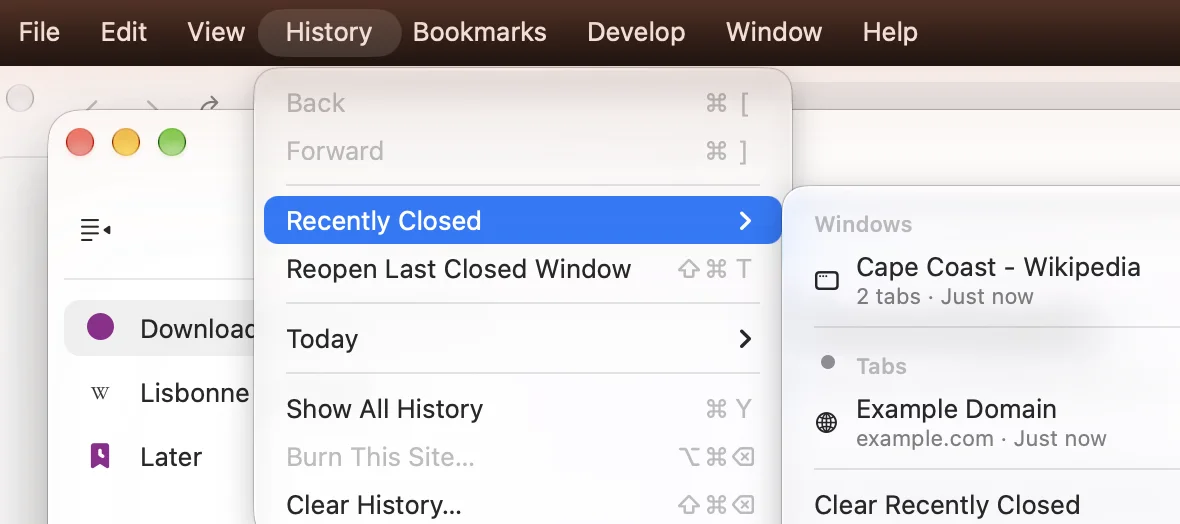
Reopen the last tab
Press Shift Command T, or choose History › Reopen Last Closed Tab. If the last thing you closed was a window, the whole window comes back. A tab reopens in the group it was in.
Reopen an older tab or window
- Choose History › Recently Closed.
- Pick a tab, or Reopen Window under a window.
Show All Recently Closed… opens the History window, where closed tabs and windows sit at the top.
Tabs at launch
ROS reopens your last session’s tabs when it starts. Turn off Reopen last session’s tabs at launch in Settings › General to start fresh; History › Reopen Last Session then brings them back when you want them.
Was this helpful?