

How ROS protects your data
No account, no telemetry. Your history, tabs and bookmarks are sealed on your device with a key that never leaves it.
Sealed on your device
History, open tabs, bookmarks, tab groups and site settings are encrypted by ROS with AES-256. The key is made on your device and kept in its keychain, for this device only: it’s never synced and never in a backup.
On Mac
Cookies and site data are protected by FileVault, so keep it on. ROS’s Privacy settings link to it.
On from the start
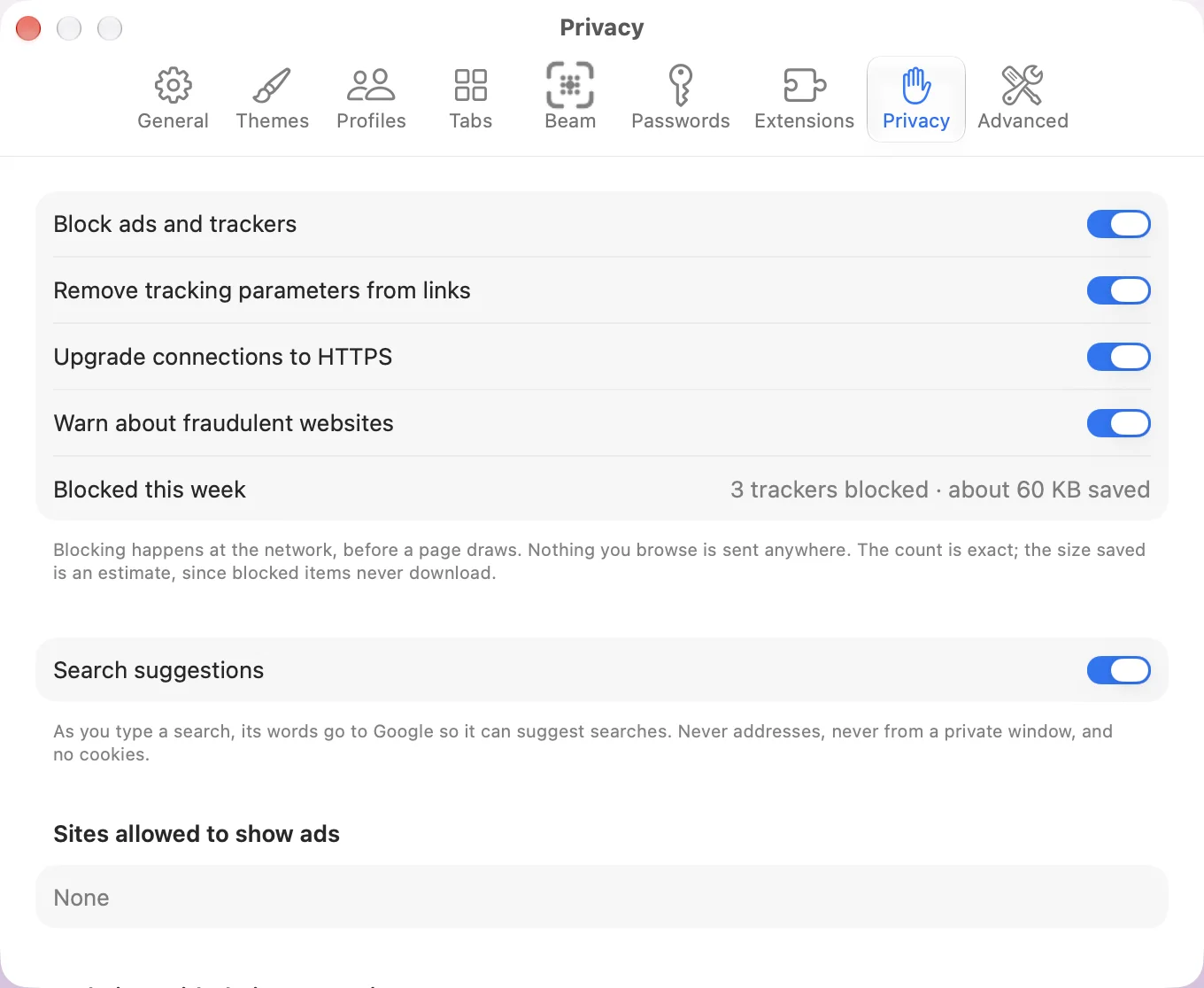
- Ads and trackers are blocked before a page loads.
- Tracking parameters are removed from links.
- Connections are upgraded to HTTPS.
- Fraudulent websites get a warning.
On Mac
You’ll find each in Settings › Privacy.
On iPhone
You’ll find each in Settings, under Privacy.
Nothing sent to us
ROS needs no account and sends no telemetry. What you browse isn’t sent anywhere. Checking for leaked passwords sends only the first five characters of a password’s fingerprint, never the password.
On Mac
To sign out of every site but your Fireproof ones when you quit, turn on Clear cookies and site data when ROS quits.
Report a security problem
Found a security problem in ROS, its distrust list or how it keeps your data? Tell us at security@rosanne.ai. We read every report and reply as soon as we can.
Was this helpful?